

php Code style
We use php-cs-fixer to format the code style. The aim is to make it use the same style as phpstorm does by default. The fixer is based on the @Symfony ruleset, with a few changes.
To format all files, you can run:
vendor/bin/php-cs-fixer fix --show-progress=estimating --verboseFor convenience, you can and should add the code style fix as a pre-commit hook. So you will never commit/push any PHP code that does not follow the code style rules.
There are two possibilities:
- Using local PHP
- Using Docker PHP
- Using your IDE:
Using local PHP
When PHP >= 7.0 is installed locally and the vendor folder is in place (by having used the automated tests or the dev environment), you can use your computers PHP to check/fix the codestyle, as this is the fastest option:
./scripts/fix-codestyle-localAdding this to .git/hooks/pre-commit could look like that:
#!/bin/sh
HASH_BEFORE=$(git diff | sha1sum)
./scripts/fix-codestyle-local
# or use
# vendor/bin/php-cs-fixer fix --show-progress=estimating --verbose
# or
# ./scripts/fix
# if the -local script throws an error
HASH_AFTER=$(git diff | sha1sum)

if test "$HASH_AFTER" != "$HASH_BEFORE" ; then
  echo "PHP Codestyle was fixed. Please read the changes and retry commit."
  exit 1;
fi
Using docker PHP
Executing the following script will use the dev environment to run the codestyle check. As it currently always runs a new container using docker-compose, it will take some seconds to execute:
./scripts/fixUsing PHPstorm
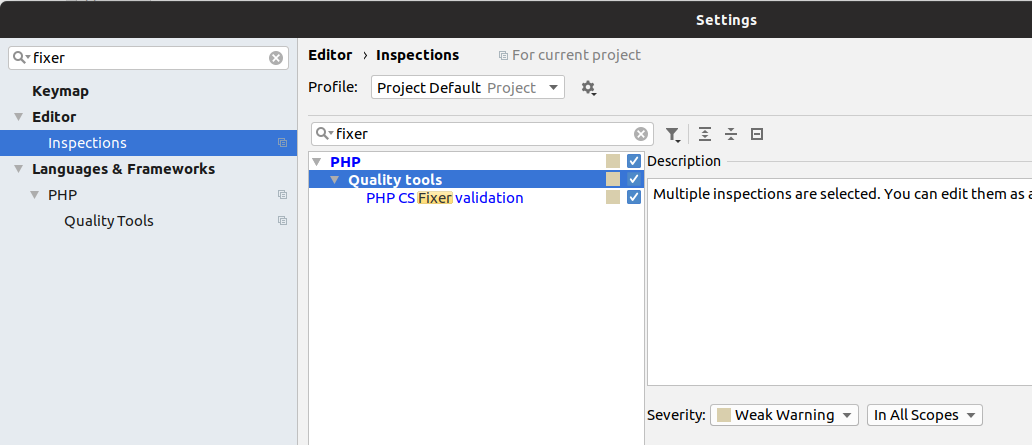
If you happen to use PHPstorm you can add php-cs-fixer to those settings as well: 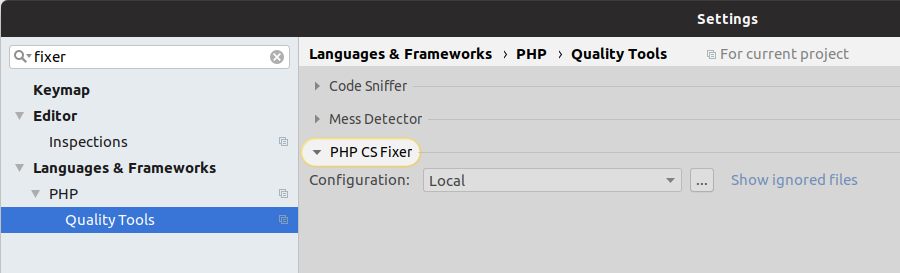
Using VSCode
You can use the php cs fixer Extension. It should work right after a restart. To fix a file right click on it and select
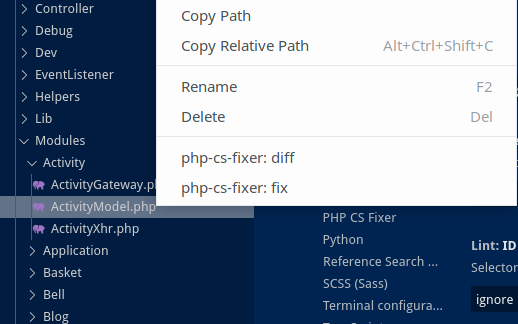
You can even configure it to fix your code style after saving a file under: Settings>PHP CS Fixer>Execute PHP CS Fixer on save for not commiting any non-fixed code.
Note: You need PHP installed locally for this.
You can use the extention i18n Ally for translations. There is a config i18nally-custom-framework.yml and settings.json in .vcode.
Xdebug (step debugging)
The dev containers ship Xdebug 3, enabled for mode=develop,debug.
On native Linux (default platform), xdebug.start_with_request=trigger is used — Xdebug only tries to connect when a request carries the XDEBUG_TRIGGER cookie/query-param/header. This keeps every other request at full speed: without the trigger, Xdebug does nothing at all. To set the trigger with one click per tab, install the Xdebug Helper browser extension instead of adding the parameter by hand.
TIP
mac/gitpod still use xdebug.start_with_request=yes (always tries to connect, no trigger needed) — fine there since those setups are usually single-developer VMs/containers anyway. If that overhead bothers you there too, switch to trigger in the respective dev-config.*.ini the same way.
PhpStorm setup
- In PhpStorm, click the "Start Listening for PHP Debug Connections" phone icon in the toolbar.
- Under Settings → PHP → Servers, add a server with:
- Host:
localhost, Port:8080. This is the port nginx listens on inside the container, which PHP reports asSERVER_PORT. It is not the18080you open in the browser. With a different port PhpStorm cannot map the session and detaches. - Use path mappings: map your local project root to
/app(the app's working directory inside the container, seedocker/docker-compose.yml).
- Host:
- Enable the trigger (Xdebug Helper extension, or
?XDEBUG_TRIGGER=1in the URL) and open the app in your browser. PhpStorm should prompt to start a debug session and stop at your breakpoints.
The trigger applies to every request of the page, including background API calls of the frontend. Switch it off again after debugging, otherwise each request tries to connect and becomes slow.
If it doesn't connect
Xdebug needs to reach a debug server (your IDE) listening on port 9003 on your host machine. From inside a container this is not 127.0.0.1 — that's the container itself. The per-platform ini in docker/conf/php/dev-config.*.ini (selected via $FS_PLATFORM in scripts/docker-compose) exists to bridge that:
default(native Linux Docker):xdebug.discover_client_host=true— Xdebug uses the actual peer IP of the incoming request, so it works regardless of which Docker bridge subnet your machine happens to have.mac:xdebug.client_host=host.docker.internal(Docker Desktop's host alias).gitpod:xdebug.client_host=172.17.0.1(gitpod's fixed bridge gateway).
TIP
You can watch Xdebug's own connection attempts live:
docker logs -f foodsharing_dev_app | grep -i xdebug(xdebug.log=/dev/stdout in all three ini files makes this possible.)
Editorconfig
Depending on your editor you need to do nothing or install or configure a plugin to use the file .editorconfig. Please refer to the section about Code style.